
Google Business Profile optimization for maximum visibility: Your complete guide
You may be surprised to learn that the reason your local competitors are listed before you on Google search results is simpler than you thought. Google Business Profile Optimization can dramatically improve your visibility online and bring more customers to your door.
A Google Business Profile optimized for today’s market is not only helpful, but essential. With 82% of US internet users searching for local businesses every week, and 72 % using Google to find local business info.
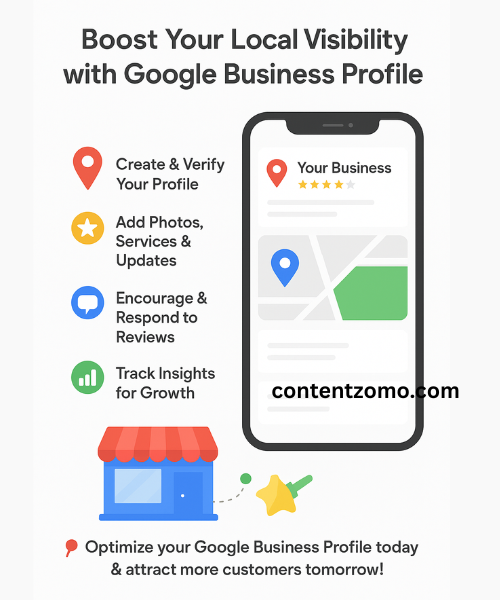
What is Google Business Profile (GBP)?
Google Business Profile, formerly Google My Business is a tool for businesses to manage their appearance on Google Search and Google Maps. Imagine it as a digital shopfront for potential clients to see when they search for similar businesses.
Google will display local search results for searches such as “plumber near [your city]” or “Italian restaurants nearby me.” These are displayed in three places.
- Local map packs The top three results will have a map.
- Local Search Results
- Google Maps
You can increase your visibility in these places by optimizing your profile.
Google Business Profile Optimization: Why it Matters
Immediate Visual Impact
84 percent of views on business profiles come from discovery search, where users look for products or services rather than a business name. Proper optimization will put your business in front of potential customers that don’t know about you yet.
Zero-Click Information Access
A profile optimized for zero-click searches will serve these “zero-click” searches effectively. A profile optimized for zero-click search will serve these searches effectively.
Customer Direct Actions
Search engines convert more customers than conventional marketing techniques when a profile is optimized. It encourages users to take immediate action, such as calling for directions or making an appointment.
Google Business Profiles: Step by step guide
Step 1: The first step is to create and verify your profile
Check your eligibility first:
- It is essential that you serve your customers in person (either on site or at their location).
- A physical address is required (home addresses are acceptable for businesses that provide services).
- It is essential to have an active direct number
Create your profile using
- Click “Manage Now” at google.com/business.
- Create a Google Account or sign in with your Google account
- Please enter your business name exactly (as it appears on your signage).
- Please add your full address and telephone number
- Choose your main business category
Video verification is important: Google will prefer that you record your business’ location and signage as well as proof of authorization to run the business. The process usually takes five days or more, but it is crucial for rankings.
Step 2: Complete each section
Information essential to include:
- Your full business address
- Phone number. (direct, no call centers)
- Hours of operation, including holidays
- URL of the website
- Description of the business using relevant keywords
Consistency of Name, Address and Phone (NAP), is essential across online platforms. Each mention of your company should be formatted the same way. Decide whether to use “Street”, “St.” or both, and use it consistently.
Step 3: Select Categories Strategically
The category you choose as your main category will determine how high you rank. Select the category which best describes your company. Choose the most specific category that accurately describes your business. For instance, “Italian Restaurant”, is preferable to “Restaurant”.
Use additional categories to explain other services you offer. This can help you appear for more diverse searches. You can add more categories to describe other services that you provide. This will help your website appear in more searches.
Step 4: Create a compelling business description
You should include:
- Explain what you do, and why you are unique.
- Use your keywords as naturally as possible
- Please mention your service area/location
- You can use all characters available (up to 775).
For example: “Family owned Italian restaurant serving authentic Tuscan food in downtown Springfield since 1995.” We are known for our wood-fired pies, handmade pastas and large wine selection. “Dine-in, Takeout and Catering Available.”
Step 5: Add High-Quality Videos and Photos
The visual content you create is essential to attract customers. Upload images of:
- Interior and exterior for your business
- Services or products that you provide
- Members of the staff at work
- Before-and-after shots
- Amenities such as parking and accessibility features
Photographic guidelines:
- High-resolution photos (minimum of 720×720 pixels).
- Use authentic photos of your business instead of stock images
- Keep your profile updated by updating photos frequently
- Include videos for even better engagement
Advanced Optimization Features
Posts and Updates
Keep your profile updated by posting weekly updates. Share:
- Promotions and Special Offers
- New products and services
- News and Events
- Seasonal Content
- Include a call to action that will drive traffic to your site
Products and Services Section
Please list your products using:
- Descriptions in detail
- Price information
- Photos of high-quality for each product/service
- Customers may search for keywords
Enable Messaging
Turn on your messaging option to allow customers to contact you through your profile. Quickly respond – a quick response can affect both ranking and conversion.
Questions and Answers
Fill this section out with the most frequently asked questions regarding:
- What are your hours of availability?
- Pricing information
- Service offered
- Parking and Location
- COVID-19 policies
The Power of Reviews
Promote Customer Reviews
Ranking factors include reviews. How to create them
- Encourage satisfied customers (but without any incentives) to write reviews
- Share your direct link to review and make it easier for.
- After a positive interaction with a request for a review, follow up
- Build reviews takes time.
Reply to All Reviews
Reacting to customer reviews shows that you care about their feedback. Always:
- Thanks customers for good reviews
- Professionally address concerns when receiving negative feedback
- Demonstrate to potential clients that you are concerned about the quality of service.
- Response quickly – ideally within 24 hours
Understand Local Ranking Factors
Google’s local business rankings are based on the following three factors:
1. Relevance
Google understands your business better when you provide complete, detailed information. Google can better understand your business if you provide detailed and complete information.
2. Distance
You can’t control this, but you can optimize for searches in your specific service area. This is something you cannot control, but it can be optimized for your service area.
3. Prominence
This includes: How popular your company is on the Internet. Included in this is:
- Quality and number of customer reviews
- Hyperlinks to other sites
- Citations on the Web
- Online reputation
Common mistakes to avoid
Don’t Stuff Keywords
This is against Google’s guidelines and can result in penalties. Google can penalize you if this is done.
Do not neglect updates
Check your profile weekly to:
- Review the new comments
- Answer new questions
- Update your photos
- Changes to business hours during holidays
Don’t ignore spam
Check your profile regularly for:
- Fake Reviews
- Incorrect information edits
- Spam questions
Google Support channels are the best way to report issues.
Measure Your Success
Use Google Business Profile insights to track your progress.
- Search queries to help customers find you
- Customer actions
- Engagement and Photo Views
- Review statistics
This data can be used to improve your optimization strategy, and find areas for improvement.
Improve Your SEO with These Tools
Tools for Free:
- Google Marketing Kit to create promotional material
- UTM Parameters to track website traffic using your profile
- Google Analytics integration for deeper insights
Tools Paid:
- BrightLocal and Whitespark are local SEO platforms.
- Review Management Software
- Professional photo editing software
Make It Work For Your Business
Google Business Profile Optimization is not a single-time job. It’s a process that needs constant attention. Beginner’s guide:
- Verification and setup of profile
- Add comprehensive business information
- Add high-quality images
- Respond to and encourage reviews
- Regularly post updates
Implement advanced features such as messaging, product/service listings and Q&A Management.
Keep in mind: The Google business profile is the first thing that potential clients see when they search for your company. Keep it up-to-date, relevant, and active.
Businesses that spend time optimizing their Google Business Profiles consistently perform better than competitors on local searches. This free tool is one of the most effective marketing tools available in today’s digital world.
Implement these strategies now and see your visibility, as well as customer base, grow steadily.